
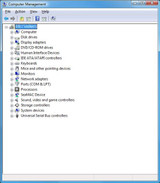
Sealevel recommends using the installed COM numbers if at all possible to avoid system conflicts. If you previously installed a USB or PCMCIA serial interface, it
… View More

Resource Center
How can I integrate a Sealevel SeaI/O or SeaDAC device with a third party application or PLC?
May 1st 2010
Sealevel SeaI/O and SeaDAC devices are fully compatible with other Modbus compliant devices, PLCs and applications. Many third-party software applications and P
… View More
Depending on your application, Sealevel digital I/O products with either optically isolated inputs or TTL level signaling can be used.Sealevel products with TT
… View More
Many third-party software packages (and PLCs) include support for the open and well-documented Modbus protocol. Sealevel SeaI/O modules use the Modbus protocol for co
… View More
Most of our bus based adapters, including PCI Express, PCI, PCMCIA, PC/104 and ISA, can be used. The adapter must have a 16C950 UART installed and suppor
… View More
SeaIO is the classic software driver that supports our PCI Express, PCI, PC/104, ISA, and classic USB digital I/O devices. SeaMAX is the driver for our late
… View More
Where is the description of the Talos API?
Feb 18th 2010
This is located in the API Documentation directory when the R9 Development suite is installed. From the Start menu, locate the Sealevel R9 Development folder and choo
… View More
What pattern is used by the WinSSD BERT test?
Jan 30th 2010
WinSSD uses the 511-bit pseudo-random test pattern defined in the ITU document O.153 section 2.1. This pattern is one bit short of being 64-bytes long. The first bit
… View More
What does BERT stand for?
Jan 30th 2010
BERT stands for Bit Error Rate Test. A BERT test provides information regarding the line quality of a serial communications link. A BERT test is included in
… View More
Where is the description of the SeaMAX API?
Jan 30th 2010
This is located in the API Documentation file when SeaMAX is installed. From the Start menu, locate the Sealevel SeaMAX folder and choose Documentation and then SeaMA
… View More
The ‘Set Configuration’ and ‘Save Configuration’ buttons are only available in the synchronous version of WinSSD test utility that is i
… View More
How does the performance of Sealevel Ethernet serial servers compare to native serial ports?
Jan 13th 2010
Sealevel Ethernet serial servers are designed to mimic the behavior of native PC serial ports. Legacy software can communicate with the Ethernet serial server&rsqu
… View More
How can I sense or switch 120V AC from a PC?
Dec 10th 2009
Sealevel offers Digital I/O TTL products that interface to industry standard relay racks and solid state relay modules that are designed to sense and switch A
… View More
Does SeaIO support Active X Controls?
Dec 10th 2009
Yes. Supporting documentation is located in the help file when SeaIO software is installed. From the Start menu, locate the SeaIO folder and choose SeaIO Help. In the
… View More
Sealevel Digital I/O products with reed relays are not designed to switch inductive loads such as the coil on another relay. If you need to switch an induct
… View More
Where is the description of the SeaIO API?
Dec 10th 2009
This is located in the help file when SeaIO software is installed. From the Start menu, locate the SeaIO folder and choose SeaIO Help. In the contents you will find a
… View More
The SeaIO software package automatically installs several application samples with source code in the samples subdirectory.To access to the samples, navigate to:[main
… View More
Where can I find the manual for my Sealevel product?
Dec 10th 2009
Click on “Site Search” in the upper right corner of the sealevel.com website. Next, select “Search Products.” In the search bar, enter your p
… View More