
What are the differences between USB 2.0 and USB 3.2?
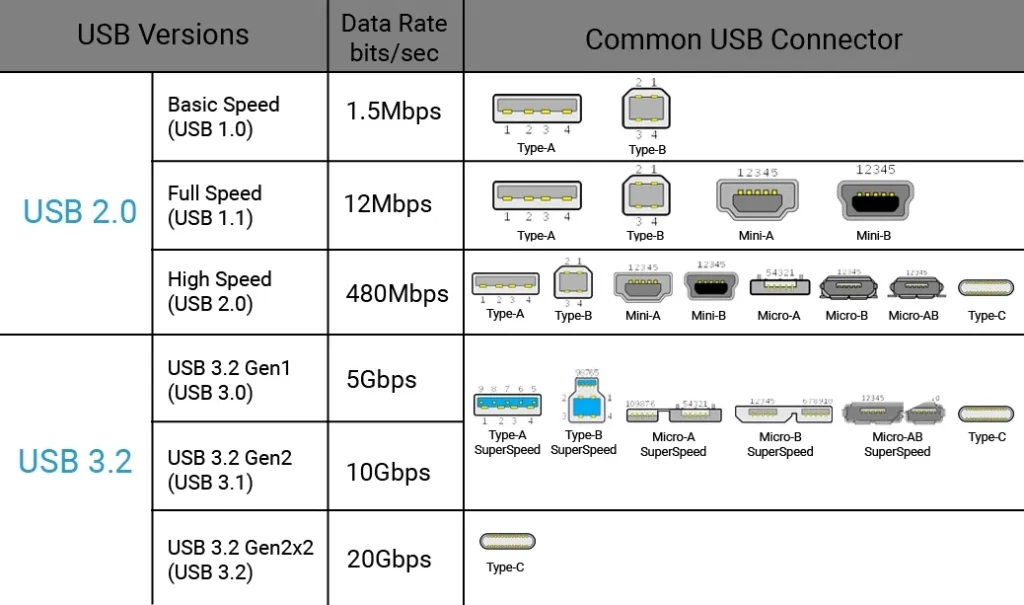
Universal Serial Bus (USB) is a set of industry-standard specifications for cables, connectors, and protocols for connection, communication, and power supply. The two most common generations are USB 2.0 and USB 3.2.
USB 2.0
While USB 2.0 has some speed, power, and bandwidth limitations over USB 3.2, it is still a very useful option, especially for simple hardware applications. It is significantly less expensive than USB 3.2.
Speed: 480 Mbit/s
Physical Characteristics & Bandwidth: Four wires that can only handle one-way communication, either in or out, at any given time.
USB 3.2
USB 3.2 has essentially absorbed all the prior 3.x specifications. In general, the term “USB 3” refers to USB 3.2.
USB 3.2 is completely backward compatible, but when utilized in a USB 2.0 connection, data speeds and power utilization are limited to USB 2.0 levels. USB 2.0 is compatible with USB 3.2 ports, except for USB 3.2 type-B connectors which utilize a new design, but again only utilize USB 2.0 functionality.
Speed: 5.0 Gbit/s to 20 Gbit/s
Physical Characteristics and Bandwidth: Eight wires total that create two unidirectional paths that allow simultaneous in and out communication.
What applications are best for USB 2.0
The overwhelming majority of USB applications work well with USB 2.0. Often, using USB 3.0 for any of the applications below adds cost and complexity, without providing any practical benefit.
Human–Machine Interfaces (HMIs) – These applications include things like keyboards, mice, touchscreens, barcode scanners, joysticks, control panels, and much more. These devices send small packets of data at low frequency. The latency and throughput demand of most HMIs are nearly trivial. Even for the highest resolution touchscreens or multi-axis joysticks, the total bandwidth usage is negligible compared to USB 2.0’s, around 35 MB/s capacity.
Serial and Legacy I/O Devices – This category includes things like USB-to-RS-232/422/485 adapters, GPIO expanders, relay controllers, and Modbus or CAN interfaces. Typical data rates of RS-232 communications are up to 1 MB/s; RS-422 and RS-485 data rates are up to 12.5 MB/s in extreme cases. Even at the upper limit, these protocols are an order of magnitude below USB 2.0’s real throughput maximums. Latency and timing are dominated by the serial protocol, not USB.
Audio Interfaces - Microphones, speakers, sound cards, audio mixers, and other audio interfaces do not require anywhere near the data rates of USB 3.0 and up. Audio in 24-bit, 192 kHz stereo only requires data rates of around 1.15 MB/s. Multi-channel audio setups (8-in / 8-out for example) stay under 10 MB/s. In fact, most of the professional, high-end recording equipment still uses USB 2.0.
Printers and Scanners – Print jobs and scanned images transfer in short bursts, not continuous high-bandwidth streams. Throughput and latency are non-critical.
Industrial Control Systems – Devices such as PLC communication, machine controllers, and embedded HMIs generally require data rates of less than 1MB/s. These systems exchange small control packets and command data, not continuous high-volume streams. Determinism and reliability matter more than raw speed.
If an application’s data flow stays below 35 MB/s and does not demand real-time HD video or bulk sensor streaming, USB 2.0 is the most efficient standard for its stability, lower power, simpler design, and lower cost.
What applications require USB 3.0?
In general, USB 3.0 and up is only required when an application needs higher sustained throughput or very low latency for large data transfers.
Applications that require USB 3.0
Machine Vision / Industrial Imaging / High-Resolution Imaging - High-resolution cameras generate enormous data streams, especially if it is uncompressed. For example, an uncompressed 1080p video @ 60 fps with 24-bit color requires data speeds of 2.98 Gb/s. Uncompressed 4K video @ 60 fps with 24-bit color requires data speeds of 11.9
Gb/s.
USB 3.0 and up can handle multiple uncompressed 1080p streams or lightly compressed 4K video in real time, with lower latency and minimal dropped frames.
High-Speed Data Acquisition (DAQ) - Instruments sampling analog or digital inputs at high rates need to continuously offload data to a host PC. Instruments and sensors sampling at hundreds of MB/s require speeds well beyond the max 35 MB/s of USB 2.0.
Video Capture / Video Broadcast - HD and 4K capture devices which stream raw or lightly compressed video to host systems for real-time encoding. USB 2.0 cannot handle the sustained data throughput speeds.
External Storage / Data Logging - Writing large amounts of data quickly for applications like high-speed logging, imaging, or system backups requires significantly faster data speeds than USB 2.0 can meet. For example, writing 10 GB of data via a USB 2.0 connection will take an absolute minimum of 5 minutes. While 2.0 speeds are merely inconvenient for data backups, they make continuous high-speed sensor or imaging data logging impossible.
See the Whitepaper: “The Determining Factor for USB, CPU, and GPU Selection” for a more detailed examination of USB specifications.
Categories: